The Beauty And Art Of Bash Script Infrastructure
10 years ago, a 13 year old Justin decided on a whim to wipe Windows from their laptop and try out Linux because they thought it would give them street cred on the Internet. Several hours and many retires later, Arch Linux was installed and a love for running Linux commands was developed.
6 years ago, a 17 year old Justin started their first job developing CRM software for mortgage brokers. They had a grand ol' time writing Python code and doing Linux server administration. Deploying to prod was two commands: git pull and apachectl -k restart. Life was good.
3 months ago, a 23 year old Justin needed to work with AWS to setup some new infrastructure for their current job. Weeks of writing CloudFormation templates, reading garbage documentation, and watching builds fail later, they started longing for the simpler times.
So I was recently on holiday in Paris. (1) (1) Unrelated to the AWS job, but was good timing nonetheless. While I was there I decided to check this blog to make sure the "low intensity view" worked. It did thankfully, but something else felt strange…
It loaded way too fast.
You see, this blog is hosted on a single VPS in Helsinki, Finland. That is almost half-way across the world from Sydney, Australia, where I normally view it.
I'm used to my blog taking around a second to load. Instead, this was almost instant. And on a 10 MB/s Internet connection!
Previously, I had just kinda accepted that "around a second" was how long it should take this site to load. But now that I've seen the light… yeah, this is unacceptable.
I should probably be running this site on a CDN, like Cloudflare or something. But since AWS gave me a pretty strong desire to go back to Linux server administration, and I generally wouldn't feel good about contributing to the increasing centralisation of the Internet, anything on the "cloud" is off-limits. Fuck the cloud. All my homies hate the cloud.
So once I got back home, I redeployed this blog on my own infrastructure with nodes in 3 different countries for low latency, high availability, geo-location routing. (2) (2) These are all buzzwords I know. All duck-taped together by a series of Bash, Python, and Rust programs. Et mon dieu, did I had the time of my life, was probably more fun than my holiday actually. (3) (3) And no wonder, the holiday was full of Fr*nch people 🤮 and going outside - the two things in life I hate the most.
Let's talk about geo-location routing. I have three servers all in different regions (Oceania, Europe, North America). If an Australian goes to justin.duch.me, I want them to be directed to the Oceania server. If a German goes to justin.duch.me, I want them to go to the European server, and so on.
The simplest way I've found to do this is how Wikipedia does it. They run a DNS server that changes the A record depending on the geo-location of your IP. I looked into PowerDNS, the DNS server software they use, but it seemed too complicated and confusing for this use-case. I also suffer from extreme "not invented here" syndrome, meaning I'd rather not use something I didn't make.
So I wrote my own DNS server.
In Rust of course.
This is racine, it uses GeoLite2 from MaxMind for geo-ip lookup (4) (4) You might be wondering why I didn't use this for the aforementioned "low intensity view". That's because I couldn't figure out how to bundle npm modules to work with njs. and trust-dns for the actual DNS parts. Because there's no way I was going to actually write a DNS server from scratch, are you kidding me? I wrote this in like a day.
racine takes a yaml config (because I don't like zone files) with your DNS records. You can give each record an optional geo argument that is used for geolocation to change the value based on continent or country.
Here's what my config looks like.
records:
- name: blog.waifu.church
  type: A
  value: 95.216.184.160
  geo:
  - continent: OC
    value: 207.148.80.96
  - continent: AS
    value: 207.148.80.96
  - continent: NA
    value: 144.202.92.225
  - continent: SA
    value: 144.202.92.225

- name: blog.waifu.church
  type: AAAA
  value: 2a01:4f9:c010:9a7d::1
  geo:
  - continent: OC
    value: 2001:19f0:5801:11a4:5400:4ff:fe8a:af3b
  - continent: AS
    value: 2001:19f0:5801:11a4:5400:4ff:fe8a:af3b
  - continent: NA
    value: 2001:19f0:8001:890:5400:4ff:fe8a:ebe1
  - continent: SA
    value: 2001:19f0:8001:890:5400:4ff:fe8a:ebe1

- name: kafka.ns.waifu.church
  type: A
  value: 95.216.184.160
- name: kafka.ns.waifu.church
  type: AAAA
  value: 2a01:4f9:c010:9a7d::1

- name: himeko.ns.waifu.church
  type: A
  value: 207.148.80.96
- name: himeko.ns.waifu.church
  type: AAAA
  value: 2001:19f0:5801:11a4:5400:4ff:fe8a:af3b

- name: seele.ns.waifu.church
  type: A
  value: 144.202.92.225
- name: seele.ns.waifu.church
  type: AAAA
  value: 2001:19f0:8001:890:5400:4ff:fe8a:ebe1

- name: waifu.church
  type: SOA
  value: kafka.ns.waifu.church justin.duch.me 2023081700 86400 10800 3600000 3600

- name: status.waifu.church
  type: CNAME
  value: status-waifu-church.fly.dev.
Yep that's right, my DNS name servers are on the same server as each deployment of this blog. This is because I didn't want to buy more servers, but it's probably fine since the name servers are literally only used for the blog.
You might also notice the blog is under blog.waifu.church instead of justin.duch.me, and that's because I didn't want to set these as the name servers for the root domain duch.me. I use other things with duch.me (like email and MX records), and I don't want something as important as that to be managed under a program I wrote in a day. Instead justin.duch.me has been set as a CNAME to blog.waifu.church.
Also, IPv6 support! Didn't have that before, so it's cool to have now.
This config needs to be in sync with all three servers, but because I'm lazy (as any good programmer is) I just rsync the config from my main server kafka.ns.waifu.church to the rest. I've setup incron on each follower server to restart racine once it detects a change to the config or the GeoLite2 database.
Next is looking at SSL support. I get my certificates from Let's Encrypt, which by default validates that you own the domain by giving you a token, where that token is then put in a file on your web server at /.well-known/acme-challenge/<TOKEN> under your domain. Let's Encrypt then tries retrieving it, and if successful, issues you a certificate.
The problem with this is that I don't know what server Let's Encrypt is going to go to in order to retrieve the token. While I'm pretty sure they'd go to the NA server, they don't provide a list of IPs they use for me to be completely certain.
One solution is to use a DNS challenge instead. For this, you validate the domain name by putting a specific value in a TXT record under that domain name. All of my servers are literally a DNS server, and I've already setup config propagation to each follower server, so this shouldn't be an issue.
Dehydrated, the ACME client I use ( certbot is bloat), makes this easy to do automatically by using a hook like the Python script below.
#!/usr/bin/env python3

import sys
import io
import subprocess
import time

from ruamel import yaml

ttl = 600

argc = len(sys.argv)

if argc < 5:
    sys.exit(0)

handler = sys.argv[1]
domain = sys.argv[2]
challenge = sys.argv[4]
acme = "_acme-challenge." + domain

if handler == 'deploy_cert':
    subprocess.run(["rsync", "-rL", "--delete", f"/etc/dehydrated/certs/{domain}", "<user>@207.148.80.96:/etc/dehydrated/certs/"])
    subprocess.run(["rsync", "-rL", "--delete", f"/etc/dehydrated/certs/{domain}", "<user>@144.202.92.225:/etc/dehydrated/certs/"])
    subprocess.run(["systemctl", "restart", "nginx"])
    sys.exit(0)

if handler != 'deploy_challenge' and handler != 'clean_challenge':
    sys.exit(0)

with open('/etc/racine/zone.yml') as f:
    data = yaml.safe_load(f)

exist = next((record for record in data["records"] if record["type"] == "TXT" and record["name"] == acme), None)

if handler == 'deploy_challenge':
    if exist:
        exist["value"] = challenge
    else:
        data["records"].append({"type": "TXT", "name": acme, "value": challenge, "ttl": ttl})
elif handler == 'clean_challenge':
    data["records"].remove(exist)
else:
    sys.exit(0)

with io.open('/etc/racine/zone.yml', 'w', encoding='utf8') as outfile:
    yaml.dump(data, outfile, default_flow_style=False, allow_unicode=True)

subprocess.run(["systemctl", "restart", "racine.ser.service"])
subprocess.run(["rsync", "-r", "/etc/racine", "<user>@207.148.80.96:/etc/"])
subprocess.run(["rsync", "-r", "/etc/racine", "<user>@144.202.92.225:/etc/"])

if handler == 'deploy_challenge':
    time.sleep(10)

sys.exit(0)
This script propagates the racine config during the "deploy_challenge" phase and also propagates the issued certificate to each server in the "deploy_cert" phase.
(5)
(5)
Maybe you're getting a bit annoyed at me at this point, but I don't see any reason to redact my IP addresses from this post. I mean, they're all one "dig" away anyway.
racine doesn't (and probably never will, as long as what I'm about to introduce keeps working) have DNS-over-TLS support, so we have to use stunnel instead, which is "a proxy designed to add TLS encryption to existing clients and servers without any changes in the programs' code."
So for that, I had to use dehydrated once again to create SSL certificates for each name server (I can use the standard HTTP challenge now, since the domain name for each name server always goes to the same place) and create a stunnel config as such.
[dns]
accept = 853
connect = 0.0.0.0:53
cert = /etc/dehydrated/certs/kafka.ns.waifu.church/fullchain.pem
key = /etc/dehydrated/certs/kafka.ns.waifu.church/privkey.pem
There's actually a few other little bash scripts I also use for tiny things like updating the GeoLite2 DB, and propagating nginx configs, but this is basically all that's there to it.
I guess we can also talk about deploying new versions of this blog. Here's my "CI/CD" script.
from fabric import task

@task
def update_system(c):
    c.run('apt update')
    c.run('apt upgrade -y')

@task
def update_blog(c):
    c.run('cd /opt/justin.duch.me && git pull')
    c.run('cd /opt/justin.duch.me && make rebuild')
Yup, that's it. It uses the Fabric Python library which is designed to execute commands over SSH. Thankfully, I already had a Makefile so I didn't need to write more stuff for deployment.
I run this command manually when I want to serve a new version (I don't want the site updated on every push).
fab -H <servers> update-blog
One last issue I had to deal with is the fact that I won't know what's going on with my blog in other regions since I'll always get the Oceania server.
For this, I quickly made status.waifu.church which is just a page detailing the status of each name and web server. It's also written in Rust, pure Rust with maud. It's pretty bare bones right now, but I'll add more detail to the page at a later date. (6) (6) Maybe I'll add htmx for some interactivity or something. Eventually… probably.
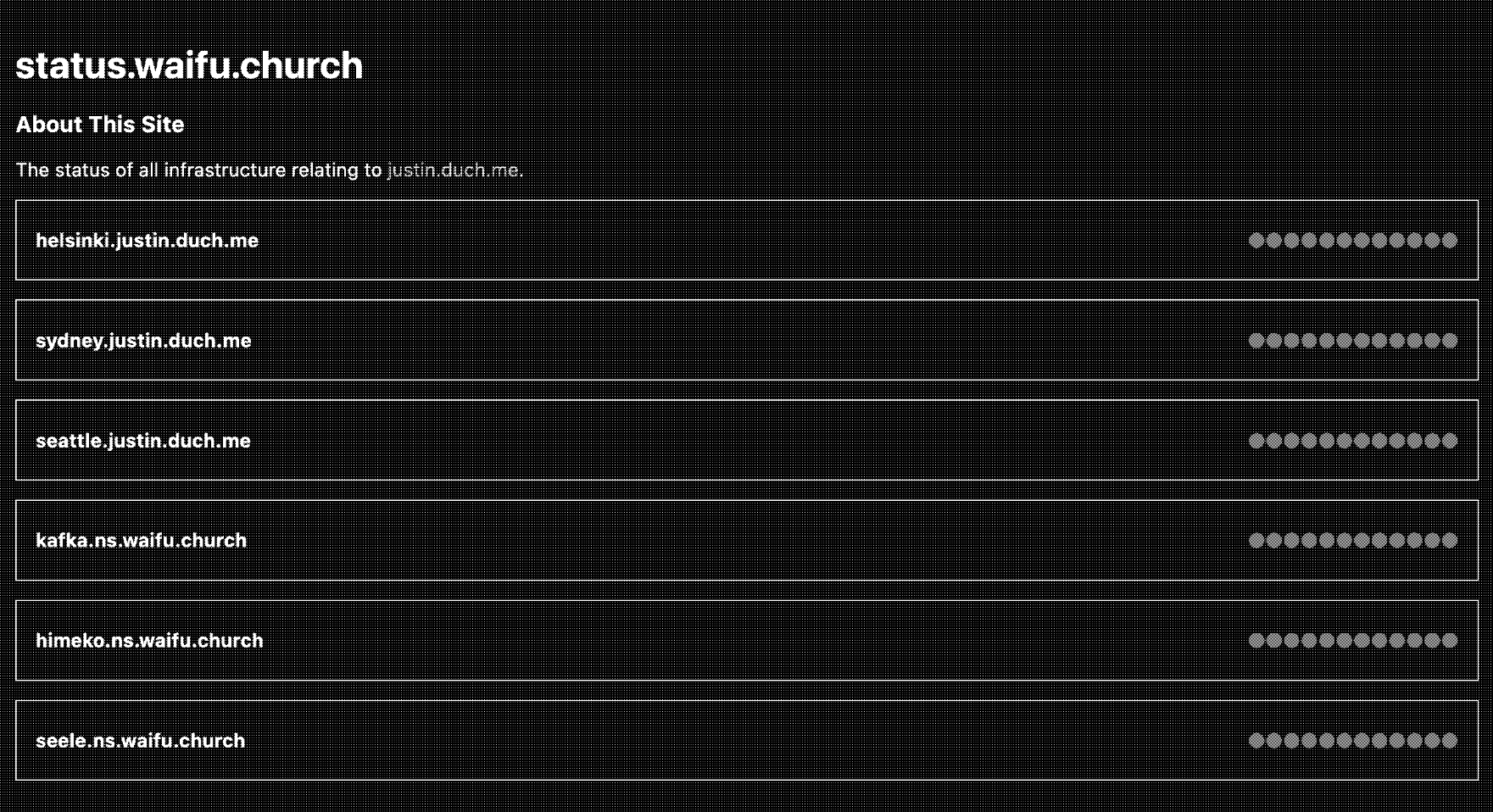
I've deployed it to Fly.io
(7)
(7)
I can give them a pass on the "cloud" because they're a small company (when compared to the usual "cloud" we talk about).
(because you shouldn't keep your monitoring tools on the same infrastructure as the thing you're monitoring, and also because they have a free tier and I really didn't want to spend more money on servers), where status.waifu.church is a CNAME to the fly domain (many head pats for you if you spotted this in the racine config from earlier).
Alright, that's about all there is to it. I don't know why, but this kinda sloppy, simple yet still overcomplicated, hanging on by a thread, infrastructure for a single dumb blog makes me feel "good" inside.
I like this.
I think this is what gardeners and house plant owners feel when they grow their plant things. (8) (8) Of course, since I've been surrounded by computers my entire life, I don't know what plants are. The sense of accomplishment and pride from nurturing something, and the calming routine of its' ongoing maintenance.
In terms of hours spent on non-work related, personal projects, this blog tops everything else by a wide margin. That's mainly due to the 4 (or 5? I lost count) rewrites of its' source code, so it was a good experience to finally take a step back and look at what that source code ran on.
Now then, what have we learnt?
- The cloud sucks big ween. AWS especially.
- Rust is the best language and should be used for everything.
- This post talks about Bash script infrastructure but mostly only shows Python scripts (really makes you think, huh?)
- I own the domain
waifu.church. - Computers are plants.
And finally, but most importantly;
- There are too many Fr*nch people 🤮 in Paris, I give the city a 2/10 (at least the baguettes were good).